

Element: Jump Links
A jump link (also known as an anchor link) is a hyperlink taking visitors further down the same page. Note: Depending on your page content, it may be best to use Collapsible Headings instead of jump links.
To create an anchor, put your cursor in the location you'd like people to find and select anchor (flag) icon in toolbar.
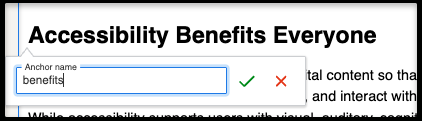
In Anchor Name dialog that appears, enter a relevant word or hyphenated words you will remember (example: benefits).
Learn More About Other Types of Jump Links
The Jump Links element styles a set of anchor links that are all on the SAME page. You can change the background color and add an optional heading and introductory text. Maximum number of jump links in the element is 14.
Accessibility and Inclusiveness at Ohio University
Ohio University is committed to creating digital experiences that are accessible, welcoming, and inclusive for all users. Our websites serve a diverse audience of students, faculty, staff, alumni, parents, community members, and visitors. Every person who visits an Ohio University webpage should be able to access information, complete tasks, and engage with content regardless of ability, background, technology, or circumstance.
Accessible and inclusive websites remove barriers, foster belonging, and ensure that everyone has equal access to information and opportunities. By prioritizing accessibility and inclusiveness, we support Ohio University's mission to provide an exceptional educational experience and create a campus culture where all individuals can thrive.
Accessibility Benefits Everyone
Accessibility is the practice of designing digital content so that people with disabilities can perceive, understand, navigate, and interact with it effectively. While accessibility supports users with visual, auditory, cognitive, neurological, and mobility disabilities, it also improves the experience for everyone.
Examples of accessible design include:
- Providing descriptive alternative text for images
- Using clear page headings and logical content structure
- Ensuring sufficient color contrast between text and backgrounds
- Creating keyboard-accessible navigation
- Providing captions and transcripts for multimedia content
- Writing meaningful link text
These practices improve usability for users accessing content on mobile devices, in noisy environments, with slow internet connections, or while using assistive technologies.
Build a Sense of Belonging Through Inclusive Content
Websites often provide a first impression of Ohio University. The language, images, and stories we share communicate who belongs within our community.
Inclusive content reflects the diversity of the people we serve and demonstrates respect for different identities, perspectives, experiences, and backgrounds. Content creators should strive to:
- Use welcoming and respectful language
- Avoid stereotypes and assumptions
- Represent diverse communities through imagery and storytelling
- Consider the needs of international audiences
- Ensure content is understandable to a broad range of readers
Inclusive websites help prospective students, employees, and visitors see themselves as valued members of the Ohio University community.
Understand the POUR Principles
Ohio University's accessibility efforts are guided by the four foundational principles of web accessibility, commonly known as POUR:
Perceivable
Information must be presented in ways users can perceive, whether through sight, hearing, or assistive technologies.
Operable
Users must be able to navigate and interact with website features using a variety of input methods, including keyboards and assistive devices.
Understandable
Content and navigation should be clear, consistent, and easy to comprehend.
Robust
Web content should work reliably across browsers, devices, and assistive technologies both now and in the future.
Applying the POUR principles helps create websites that are usable by the widest possible audience.
Create Accessible Content in the Web CMS
Every web editor plays an important role in maintaining accessible and inclusive digital experiences. When creating or updating content in the Ohio University Web CMS, editors should:
- Structure content using proper heading levels
- Write concise and descriptive page titles
- Add meaningful alternative text to images
- Use descriptive hyperlinks instead of generic phrases such as "click here"
- Verify color contrast requirements are met
- Ensure PDFs are accessible before publishing
- Caption videos and provide transcripts when appropriate
Accessibility should be considered throughout the content creation process rather than added as a final step.
Support University Goals
Accessible and inclusive websites support Ohio University's strategic priorities by improving communication, increasing engagement, and expanding access to information. They also help the University:
- Meet legal and regulatory requirements
- Support students, employees, and visitors with disabilities
- Improve search engine optimization and content discoverability
- Strengthen brand reputation and trust
- Demonstrate a commitment to equity and belonging
By embedding accessibility and inclusiveness into everyday web practices, Ohio University creates digital experiences that reflect its values and serve the entire community.
Our Shared Responsibility
Creating accessible and inclusive websites is a shared responsibility. Web editors, content contributors, designers, developers, communicators, and leaders all contribute to a positive digital experience.
Every decision—from selecting an image to writing a heading or publishing a document—can either remove barriers or create them. By making accessibility and inclusiveness part of our daily work, we help ensure that Ohio University's digital spaces are welcoming, usable, and meaningful for everyone.
Together, we can create web experiences that support learning, foster belonging, and provide equitable access to information for all members of the Ohio University community.